

Not this kind of beaconing :)))
What is Beaconing Malware?
Beaconing malware refers to malicious software that regularly communicates with a command-and-control (C2) server to receive instructions or exfiltrate data. This communication often occurs at some intervals, creating a “beacon” pattern in network traffic.
The beaconing intervals can be fixed or randomized to evade detection. Common examples of beaconing malware include various types of trojans, spyware, and advanced persistent threats (APTs). And the protocols used for beaconing can vary widely, including HTTP/S, DNS, ICMP, and custom protocols.
Detection Methods
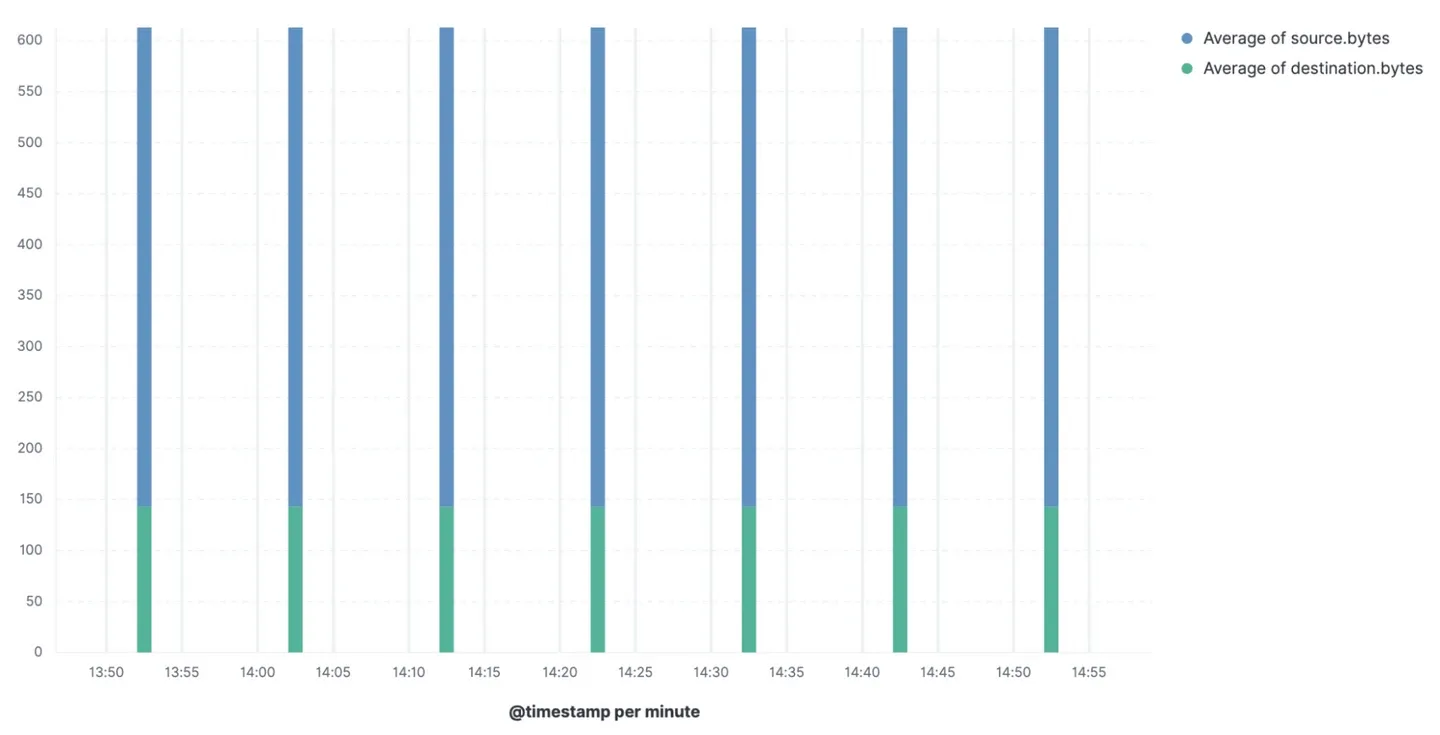
Lets look at this amazing example of beaconing malware from Elastic. Some beacon consistently at an interval of 10 minutes as the source, the payload size, and the destination remain the same. This makes it easy to detect using simple statistical methods.
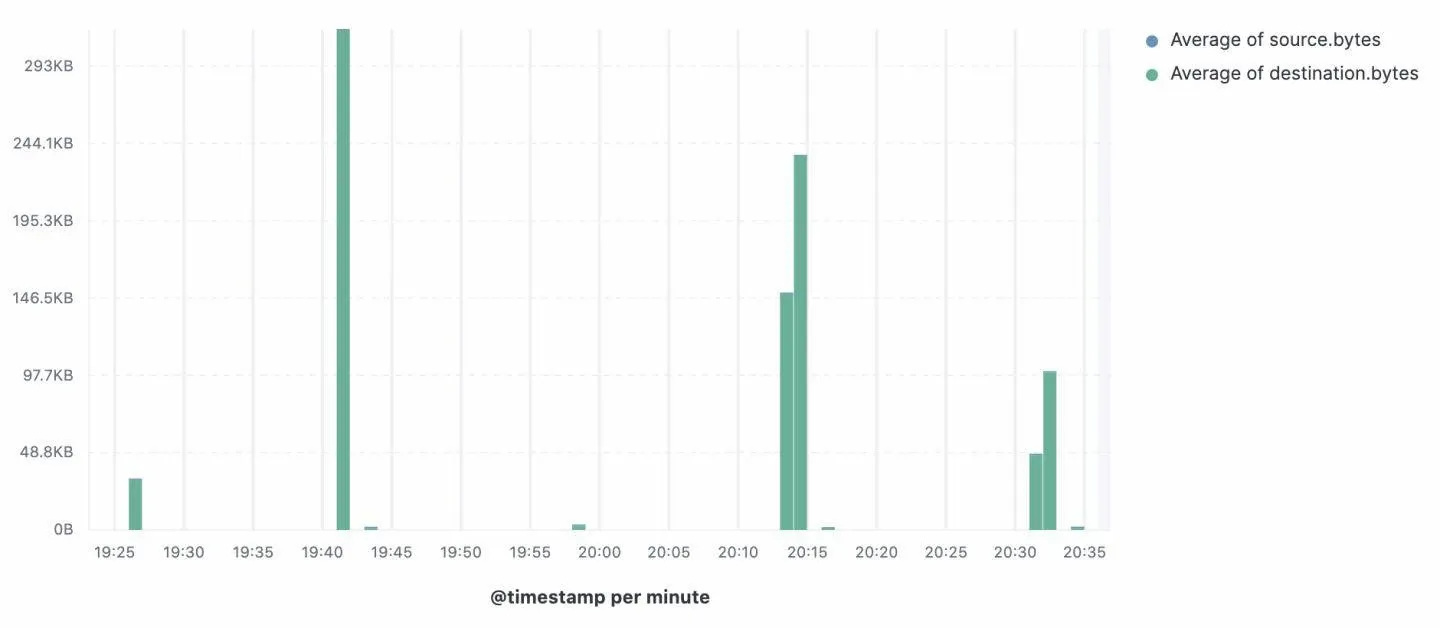
But real things are not always that easy. Some beacon at random intervals to avoid detection. Here is an example of such beaconing malware:
So then, how actually can we detect beaconing malware? Personally, I would try the following methods:
Network Layer
Analyze network traffic for regular patterns of communication to specific IP addresses or domains. Look for consistent intervals between outbound connections, which may indicate beaconing behavior like the first example above.
But for the second example, we no longer can rely on fixed intervals. But still can get the statistical patterns of communication that might indicate beaconing. Like this:
index="cobaltstrike_beacon" sourcetype="bro:http:json"| sort 0 _time| streamstats current=f last(_time) as prevtime by src, dest, dest_port| eval timedelta = _time - prevtime| eventstats avg(timedelta) as avg, count as total by src, dest, dest_port| eval upper=avg*1.1| eval lower=avg*0.9| where timedelta > lower AND timedelta < upper| stats count, values(avg) as TimeInterval by src, dest, dest_port, total| eval prcnt = (count/total)*100| where prcnt > 90 AND total > 10Let break this Splunk query down:
index="cobaltstrike_beacon" sourcetype="bro:http:json"is for indicating the index and sourcetype of the data. Here isbro:http:jsonwhich is the HTTP logs from Zeek.sort 0 _timesorts the events by time in ascending order.streamstats current=f last(_time) as prevtime by src, dest, dest_portcalculates the previous timestamp for each source-destination pair.eval timedelta = _time - prevtimecalculates the time difference between the current and previous events.eventstats avg(timedelta) as avg, count as total by src, dest, dest_portcomputes the average time difference and total count of events for each source-destination pair.eval upper=avg*1.1sets an upper limit for the time difference by adding a 10% margin to the average.eval lower=avg*0.9set a lower limit for the time difference by subtracting a 10% margin from the average.where timedelta > lower AND timedelta < upperfilters events where the time difference falls within the defined upper and lower limits.stats count, values(avg) as TimeInterval by src, dest, dest_port, totalaggregates the count of events and the average time interval for each source-destination pair.eval prcnt = (count/total)*100calculates the percentage of events that fall within the defined time interval.where prcnt > 90 AND total > 10filters for source-destination pairs where more than 90% of events fall within the defined time interval and there are more than 10 total events.
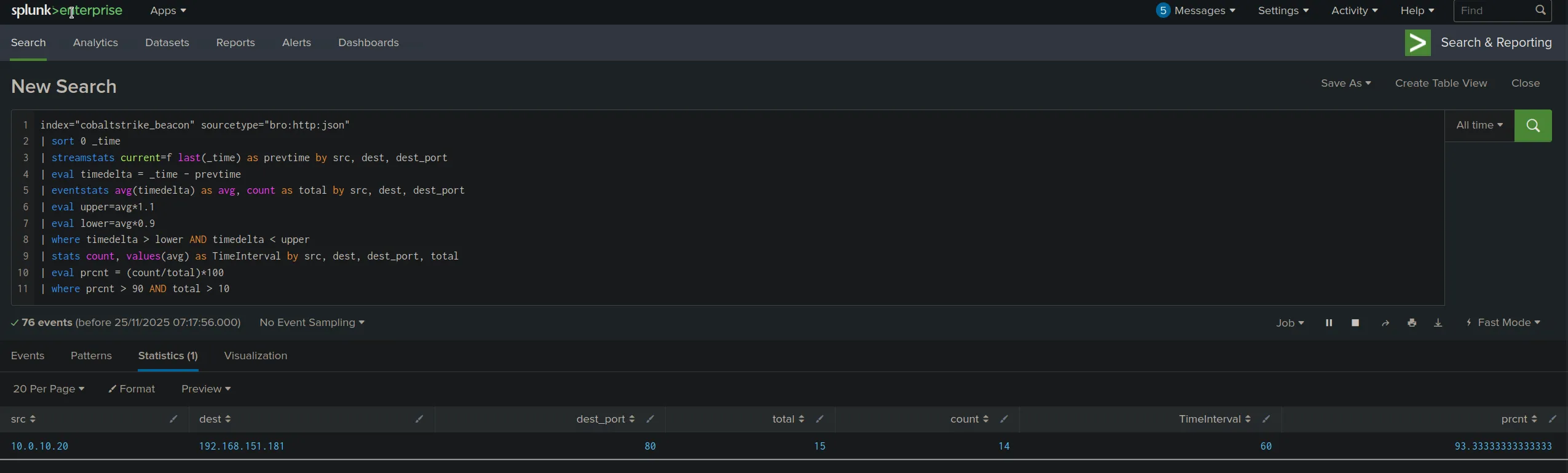
With that Splunk query, we can detect beaconing patterns even when the intervals are not perfectly consistent. The key is to look for connections that fall within a narrow statistical range around their average interval, which is characteristic of beaconing behavior.
Modern malware often incorporates jitter (randomness) into beacon intervals to evade detection. Advanced threats may also extend their beacon intervals to blend in with legitimate network traffic. However, by analyzing statistical patterns and allowing for reasonable variance thresholds (like the 10% margin in the query above), we can still identify these more sophisticated beaconing patterns.
But this work take time and effort to fine-tune the detection parameters to minimize false positives while effectively identifying beaconing malware. We can also combine this method with other detection techniques, such as anomaly detection and machine learning, to improve accuracy and reduce false positives. Elastic has a great blog post on this topic which you can read here
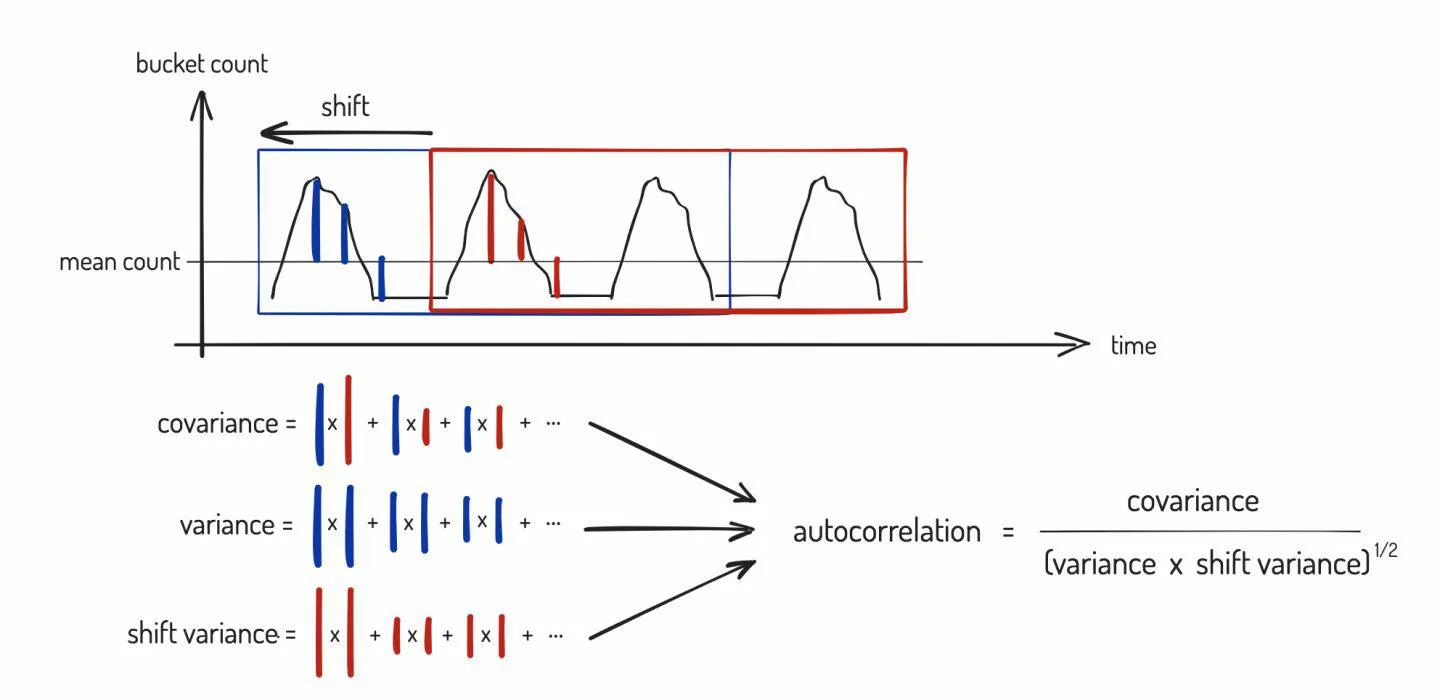
All this images take from the Elastic blog post.
And they make a release of the detection rules for this as well (Sadly its from 2022 but still label as a Pre-release then we can see how hard it is to detect this from network layer).
Endpoint Layer
Well beacon is still a malware, right? So I can be sure that they never run as a standalone exe file :) They will take advantage of process injection or hollowing techniques to hide their presence within legitimate processes.
So to detect these kinds of beaconing malware from the endpoint layer, we need to focus on several key areas:
Process Behavior Analysis
Beaconing malware often exhibits suspicious process behaviors that can be detected through endpoint monitoring:
Suspicious Process Creation Patterns:
- Processes spawning from unusual parent processes (e.g.,
excel.exespawningpowershell.exe) - Scheduled tasks or services created for persistence
- Processes with unusual command-line arguments
- Repeated process creation at regular intervals
Process Injection Indicators:
- Remote thread creation into other processes
- Memory allocation patterns (VirtualAllocEx, WriteProcessMemory)
- Process hollowing (creating suspended processes and replacing their memory)
- DLL injection techniques
Example Sysmon configuration to detect process injection:
<Sysmon schemaversion="4.90"> <EventFiltering> <!-- Detect CreateRemoteThread --> <CreateRemoteThread onmatch="include"> <TargetImage condition="contains">explorer.exe</TargetImage> <TargetImage condition="contains">svchost.exe</TargetImage> </CreateRemoteThread>
<!-- Detect Process Hollowing --> <ProcessAccess onmatch="include"> <GrantedAccess condition="is">0x1F0FFF</GrantedAccess> <GrantedAccess condition="is">0x1FFFFF</GrantedAccess> </ProcessAccess> </EventFiltering></Sysmon>Scheduled Tasks and Persistence Mechanisms
Beaconing malware needs persistence to survive reboots. Common persistence mechanisms include:
- Windows Scheduled Tasks
- Registry Run Keys
- Windows Services
Check all these locations for unusual entries that may indicate beaconing malware.
Named Pipes
Cobalt Strike post-ex modules use named pipes for pivoting and communication. Monitor for the creation of named pipes with suspicious names or patterns that deviate from normal behavior:
\\.\pipe\msagent_#
\\.\pipe\postex_#
\\.\pipe\msse_#Sliver also have named pipe communication. You can find more about Sliver named pipe here.
Use Sysmon Event ID 17 and 18 to monitor named pipe creation and connection events.
Conclusion
Detecting beaconing malware is a critical skill for any blue team analyst or security professional. Throughout this article, we’ve explored detection methods across two primary layers:
Network Layer Detection allows us to:
- Identify regular communication patterns through statistical analysis
- Detect beaconing even with jitter and randomization
- Use tools like Splunk, Zeek, and Elastic to analyze traffic patterns
- Correlate multiple indicators to reduce false positives
Endpoint Layer Detection provides deeper visibility into:
- Process behaviors and injection techniques
- Persistence mechanisms (scheduled tasks, registry, services)
- Named pipe communications used by C2 frameworks
- Memory-resident threats that avoid disk artifacts
Note
The most effective approach combines both network and endpoint detection. Network layer shows you the “what” (the beaconing pattern), while endpoint layer reveals the “who” (which process) and “how” (the technique used).
Actually, detecting beaconing malware is an ongoing challenge as adversaries continuously evolve their tactics. Staying updated with the latest threat intelligence, refining detection rules, and leveraging advanced analytics are essential to maintaining robust defenses against these persistent threats.